
Aim your camera at a pack, a label, or your actual meal, and Workout Titan Nutrition pulls the numbers for you.

Weekly overview
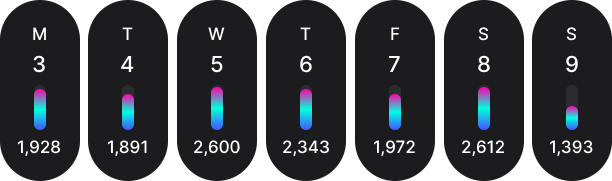
A week laid out in seven small columns, each one the colour of the day you had.
Seven days, side by side, each one drawn from what you actually ate. Water at the base, then carbs, protein and fat stacked in their own colours, every bar measured against your biggest day. Tap one to open it. Or read the row and take in a week of calorie tracking without opening anything at all.
Calorie counting
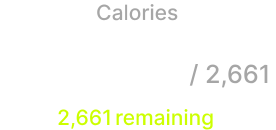
Everything you have eaten, everything you have left, and nothing in between to interpret.
A calorie counter that does one thing properly. Your total climbs as you log, your goal sits beside it, and the line below says what is left, in lime, or how far past you have gone, in red. Set it daily or weekly. Or leave it blank, and let the number simply be a number.
Daily macro targets
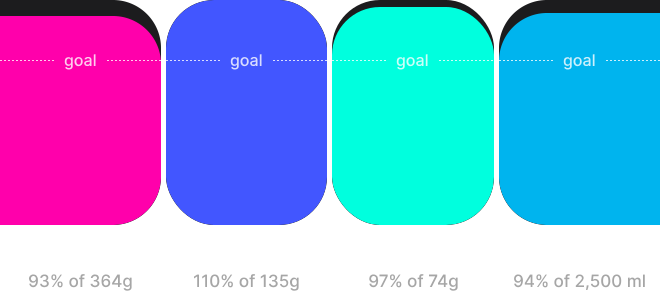
Four columns rising, the shape of a day told in carbs, protein, fat and water.
Macro tracking you can read at a glance. Carbs, protein, fat and hydration rise as four bars, each with its own colour and its own goal line, so overshooting is something you see rather than calculate. Underneath, what most apps bury: saturated fat, sugar, fibre, salt and your five a day.
Weight logging
The slow line of a body changing, six months of it at a time.
Weight tracking in kilograms, pounds or stone, whichever you actually think in. Six months of scrolling chart, peaks marked, plateaus left exactly where they fell, nothing smoothed away to make the story neater. Your goal weight, your rate per week and your calorie target all move together, so the numbers stay in step with the person carrying them.

Food scanning
Point the camera, and the label reads itself.
AI food scanning in two moves. Photograph the front of a pack, then its nutrition panel, and the numbers come straight off the label. Or turn the camera on the plate instead and let the AI estimate the whole meal. Either way the result arrives badged with its source, because a number without a source is only a guess in a good suit.

Meal macro overview
Every meal split into three colours, and totalled in a single line above them.
Each meal carries its own bar. Carbs in pink, protein in indigo, fat in aqua, every segment sized by what is actually on the plate and the whole thing totalled in calories above. Log something with nothing to split and the bar steps aside rather than drawing an empty one. The smallest chart in the app, and the one you will read most.

Whole day insight
Breakfast, lunch, dinner, snacks. Four cards, and the whole day inside them.
Meal tracking with the detail left in. Every food keeps its brand, its serving, the time you logged it and a badge saying where its numbers came from. Swipe a row to edit, copy or delete. Change the serving in grams, ounces or millilitres and watch the calories move as you type. Copy a meal into tomorrow, or save it to your cookbook and log it again in a tap.
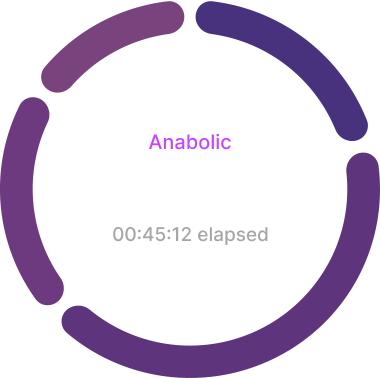
Intermittent fasting
A violet dial, turning once a second, holding the hours you are not eating.
An intermittent fasting tracker built around the window, not the willpower. Choose anything from twelve hours to twenty, and backdate the start if your last meal is already well behind you. The ring is split into the stages a fast passes through, anabolic to autophagy, each one filling as you reach it. And none of it reaches your coach. This one is yours.
Hydration logging
A day measured in glasses, with a quiet note kept of every coffee.
Water tracking in four taps: 250ml, 500ml, 750ml, a litre, or type your own. Flag the caffeinated ones and they are counted apart, badged in the log, totalled on their own, and drawn as squares rather than circles across six months of chart, so the distinction survives even without colour.
Get the app
Start with one meal
Photograph something, log it, and see the day take shape. Scanning and lookups are free to try, and if you train with a Workout Titan coach, everything you log arrives with them automatically.
Learn more
Answers to the questions people ask before they start logging, from what the AI actually does to what it costs.
What is Nutrition by Workout Titan?
Workout Titan Nutrition is an AI-powered food logging app built for people who want to understand what they eat without spending their evening typing it in.
Log food by photographing it. Point the camera at a pack and it reads the label and barcode together. Point it at a plate and the AI estimates the meal. Every entry is checked against your saved foods, the Open Food Facts database, an AI estimate and your own history, and every result shows you where its numbers came from, with a confidence rating on AI estimates from search.
In the app you can:
- Log food by camera, barcode, photo, search or straight from your cookbook
- See calories against your goal and exactly what's left in the day
- Read your macros as four bars, carbs, protein, fat and hydration, each against its own target
- Track saturated fat, sugar, fibre, salt and your five a day
- Log weight in kilograms, pounds or stone and see six months on one chart
- Log hydration in a tap, with caffeinated drinks counted separately
- Run an intermittent fast on a dial that shows each stage as you pass through it
- Rate the day, write a note and set your own reminders so tracking never slips
It works on its own, and it works alongside a coach. If you train with someone on Workout Titan Coaching, your food and weight logs and end-of-day notes reach them as you log them, and you can switch sharing off whenever you like.
Every tracker above is free with no time limit. Camera logging and food search come as an allowance of 15 photo scans and 15 lookups for the life of the account; Pro makes both unlimited. See what Pro adds and compare plans.
How accurate is AI food tracking?
Accurate where it counts, and honest where it can't be. Most apps won't tell you the difference. We do.
Log a packaged food and the numbers come straight from the label. The app photographs it, reads the nutrition panel and barcode together, and cross-checks the result against Open Food Facts, a community-maintained database of millions of products. That's as accurate as food tracking gets, because you're working from the manufacturer's own figures rather than an estimate.
Photograph a plate of food and AI does the estimating. It recognises what's on the plate and judges portion sizes from the image, which is useful but never perfect. Portion sizes are hard to judge from a photo, and we'd rather tell you that than pretend otherwise. So every entry carries a badge showing where its numbers came from, and AI estimates from search also carry a confidence rating: high when multiple sources agree and cross-check, moderate when they broadly line up, low when they disagree. If a serving size looks uncertain, the app flags it and asks you to check the amount before saving.
Every value on every food is editable. If you know the portion was bigger, or you cooked it differently, change it. Your edits apply only to your own log, so nothing you adjust affects anyone else's data.
The truth about tracking is this: consistent, imperfect numbers reveal patterns you'd never otherwise see. A week of estimates beats a single day of precision, and an app that's honest about its confidence is one you can actually rely on.
Do I need a coach to use Workout Titan Nutrition?
No. Workout Titan Nutrition works entirely on its own. Set your own goals, log your own food and track your own progress, and nothing is shared with anyone.
If you do train with a coach on Workout Titan Coaching, connecting is where the app becomes even more useful. Your food logs, weight entries and end-of-day notes appear on their side as you log them, so check-ins start from what actually happened rather than what you can remember. Your coach sets your calorie and macro targets and adjusts them as you progress, and coaches on select plans can include Pro for their clients at no cost.
You stay in control throughout. Sharing can be switched off at any time in Manage account, and switching it back on is never retroactive: only new data from that point forward is shared, never anything from the period you were disconnected.
One exception worth knowing: fasting is never shared with your coach. That data stays private to you, always.
What is free, and what needs Pro?
You can use Workout Titan Nutrition without paying, and without a time limit. Logging food, tracking calories and macros, weight, hydration, fasting, your cookbook, the week view, reminders and end-of-day notes are all free.
Every account also gets 15 free AI photo scans and 15 free food lookups so you can try the AI properly. These are lifetime allowances rather than daily ones, so spend them whenever it suits you.
Pro adds two things:
- Unlimited AI photo scans and food lookups, so you can photograph as much as you like
- The AI-powered daily summary, which reads your day back to you and flags what's worth changing
If you train with a coach on the Workout Titan Coaching Performance or Infinity plan, Pro is included at no cost to you. Ask your coach if you're unsure whether you're covered, or compare plans on our pricing page.
Which devices does Workout Titan Nutrition work on?
Workout Titan Nutrition is available on iOS from the App Store and on Android from Google Play. It requires iOS 17.0 or later, or Android 8.0 or later, and also runs on select Chromebooks that support Play Store apps. It's a native app, built for the camera-first way you log, so scanning a label or photographing a plate is fast and feels like part of the phone rather than a website in a wrapper.
If you train with a coach on Workout Titan Coaching, you can connect from either platform and your data reaches your coach in exactly the same way. Workout Titan Coaching itself runs on iOS, iPadOS, macOS, visionOS, Android and ChromeOS, so you and your coach don't need to be on the same kind of device.
Your account and history stay with you across devices. Sign in on a new phone and everything you've logged is there.
What AI powers Workout Titan Nutrition?
Workout Titan Nutrition doesn't rely on a single model. It combines OpenAI, Perplexity and a deep connection to Open Food Facts, each doing the job it's best at.
OpenAI handles recognition and estimation: reading a nutrition label from a photo, identifying what's on a plate and judging portion sizes. Perplexity powers food lookups, searching for products and nutrition data when a food isn't already in your history or on a label in front of you. Open Food Facts, a community-maintained database of millions of packaged products, provides verified label data whenever you scan a barcode or log a known product, and acts as the cross-check for everything else.
The reason for using all three is accuracy. AI models are excellent at understanding what they see but can only estimate what they can't measure, while a database is precise but only knows about products it contains. Blending them means you get label-accurate numbers where they exist and a well-reasoned estimate where they don't, and every entry tells you which it was, with a confidence rating on AI estimates from search.
Your photos and logs are used to give you results, not to train anyone's models. See our Privacy Policy for the full detail.
Calorie calculator
Work out your daily calorie and macro targets from your weight, activity and goal. Free, and no account needed.
Our approach to AI
How the AI works, what it estimates, where its numbers come from and where it can get things wrong.
Data protection
Learn how we collect, use, and protect your personal data. No jargon, no surprises.